Quick answer
Effective study notes are short, in your own words and built for testing yourself. Pick a method that suits the subject (Cornell notes, outlines, mind maps or tables), add questions as you review, and finish each topic by condensing it onto a single page you can revise from. Re-reading notes feels productive; quizzing yourself from them is what makes things stick.
Many students copy down as much as they can in class, then re-read it before exams. It feels like work, but learning research has repeatedly found that retrieval practice — trying to recall information without looking — produces better long-term memory than re-reading. Good notes are designed to make that easy. Here's how to take them, organize them and turn them into revision material.
In this article
Four note-taking methods and when to use them
| Method | How it works | Best for |
|---|---|---|
| Cornell notes | Page split into notes, a cue column for questions, and a summary at the bottom | Lectures and textbooks in most subjects |
| Outline | Headings and indented bullet points | Well-structured lectures; history, law, biology |
| Mind map | Central topic with branches for subtopics | Brainstorming, seeing connections, essay planning |
| Table / matrix | Rows for items, columns for features | Comparing theories, compounds, periods, methods |
You don't have to choose one forever. Many students outline during lectures, then turn the outline into a table or mind map when reviewing.
The Cornell method, step by step
The Cornell system was developed by Walter Pauk at Cornell University. It builds review and self-testing into the page itself.
- 1Divide the page: a narrow left column (about a third), a wide right column, and a strip across the bottom.
- 2During class, write notes in the right column — key ideas, definitions, examples. Use abbreviations and leave space.
- 3Within a day, write questions or keywords in the left column that the notes answer. “What are the three causes of…?”
- 4Summarize the page in two or three sentences at the bottom.
- 5To revise, cover the right column and answer the questions on the left out loud.
Write less, and in your own words
- Paraphrase instead of transcribing. Putting an idea in your own words forces you to understand it.
- Capture structure: main point, supporting points, examples. Skip filler.
- Mark what you don't understand with a symbol (like ?) and follow up the same week.
- Use visuals where they help: a quick diagram of a process or a timeline often replaces a paragraph.
Turn notes into revision: test, don't re-read
Two techniques with strong research support make notes far more useful:
- Retrieval practice: close the notes and write or say everything you remember, then check. Use the questions in your cue column, flashcards or past papers.
- Spaced repetition: review each topic several times with growing gaps — for example after a day, a few days, a week, then a few weeks — instead of cramming once.
Plan your sessions with a timer so revision has a shape: 25–40 minutes of testing yourself on one topic, then a short break.
Try the free Study TimerTrack focus sessions per subject and see how long you've studied.
Finish each topic with a one-page summary
Before an exam, condense each topic onto a single page: key definitions, formulas, a diagram or two and the questions you keep getting wrong. Deciding what earns a place on the page is itself a form of revision — and the result is something you can review in minutes.
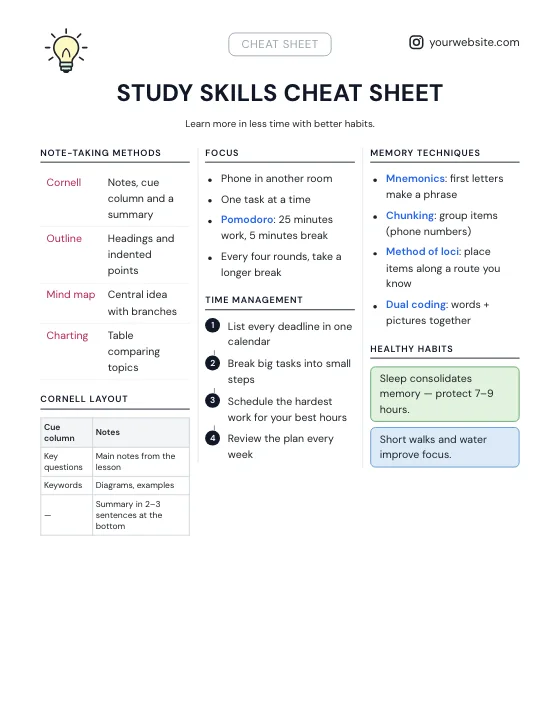
See our step-by-step guide on how to make a cheat sheet for layout tips.
Try the free Cheat Sheet MakerStart from a study template or paste your notes and turn them into a printable one-page sheet.Digital or paper?
Both work. Handwriting tends to make you summarize because you can't write everything down; typing is faster, searchable and easy to reorganize. A common compromise is handwriting in class and typing up a condensed version afterwards — which doubles as your first review. Whatever you choose, keep one folder or notebook per subject with dated, titled pages.
Frequently asked questions
What is the most effective way to take study notes?
Write short notes in your own words using a structure such as Cornell notes, then turn them into questions and test yourself regularly. Self-testing from notes works better than re-reading them.
What is the Cornell note-taking method?
A page layout with a wide column for notes, a narrow column for questions or keywords, and a summary at the bottom. You cover the notes and answer the questions to revise.
Is it better to handwrite or type notes?
Both can work. Handwriting encourages summarizing; typing is faster and searchable. Many students handwrite in class and type a condensed version afterwards.
How often should I review my notes?
Use spaced repetition: review a topic soon after learning it, then again after increasing gaps such as a few days, a week and a few weeks.