
Quick answer
The JavaScript you reach for most is a short list: const/let, arrow functions, template literals, destructuring and spread, the array methods map, filter, reduce, find and some, optional chaining (?.) and nullish coalescing (??), async/await with fetch, and ES modules. This page collects them with short, working examples.
This is a practical reference for modern JavaScript (ES2015 and later) — the syntax and methods used in everyday front-end and Node.js code. Every example is small enough to paste into your browser's console. Bookmark it, or turn the parts you use most into a printable one-page sheet.
In this article
Variables, types and comparisons
const rate = 0.2;        // can't be reassigned (default choice)
let count = 0;           // can be reassigned
count += 1;

typeof "hi";             // "string"
typeof 42;               // "number"
typeof null;             // "object"  (a long-standing quirk)
Array.isArray([1, 2]);   // true

1 === "1";               // false — strict equality, no type conversion
1 == "1";                // true  — loose equality; avoid it
Use const by default and let when a value must change. Avoid var, which is function-scoped and hoisted in surprising ways.
Strings
const name = "Ada";
const greeting = `Hello, ${name}!`;   // template literal

"  trim me ".trim();               // "trim me"
"JavaScript".includes("Script");   // true
"a,b,c".split(",");                // ["a", "b", "c"]
"hello".toUpperCase();             // "HELLO"
"report.pdf".endsWith(".pdf");     // true
"5".padStart(3, "0");              // "005"
"one two two".replaceAll("two", "2"); // "one 2 2"
Array methods
const prices = [12, 30, 7, 45];

prices.map((p) => p * 1.2);          // new array, each value changed
prices.filter((p) => p > 10);         // [12, 30, 45]
prices.reduce((sum, p) => sum + p, 0); // 94
prices.find((p) => p > 20);           // 30 (first match) — or undefined
prices.findIndex((p) => p > 20);      // 1
prices.some((p) => p > 40);           // true
prices.every((p) => p > 5);           // true
prices.includes(7);                   // true
prices.at(-1);                        // 45 (last item)

[...prices].sort((a, b) => a - b);    // numeric sort, without mutating prices
[[1, 2], [3]].flat(); // [1, 2, 3]| Method | Returns | Changes the original? |
|---|---|---|
map / filter / slice / concat | A new array | No |
sort / reverse / splice | The same array | Yes |
toSorted / toReversed | A new array | No (ES2023) |
find / reduce / some / every | A single value | No |
forEach | undefined | No (use for side effects) |
Objects, destructuring and spread
const user = { id: 7, name: "Sam", role: "admin" };

const { name, role = "viewer" } = user;     // destructuring with a default
const [first, ...rest] = [1, 2, 3];          // first = 1, rest = [2, 3]

const updated = { ...user, role: "editor" }; // copy with a change
const merged = [...[1, 2], ...[3, 4]];       // [1, 2, 3, 4]

Object.keys(user);     // ["id", "name", "role"]
Object.values(user);   // [7, "Sam", "admin"]
Object.entries(user);  // [["id", 7], ["name", "Sam"], ["role", "admin"]]

const copy = structuredClone(user);          // deep copy
Spread makes a shallow copy: nested objects are still shared. Use structuredClone for a deep copy of plain data.
Functions and modern operators
function add(a, b = 0) { return a + b; }   // default parameter
const square = (n) => n * n;                 // arrow function
const sum = (...nums) => nums.reduce((s, n) => s + n, 0);

user?.address?.city;         // undefined instead of an error if missing
user.nickname ?? "Guest";    // "Guest" only if null or undefined
0 || 10;                     // 10  (|| treats 0 and "" as missing)
0 ?? 10;                     // 0   (?? keeps 0 and "")

count ||= 1;                 // assign if falsy
settings.theme ??= "light";  // assign if null/undefined
Promises, async/await and fetch
async function getUser(id) {
  const res = await fetch("/api/users/" + id);
  if (!res.ok) throw new Error("HTTP " + res.status);  // fetch doesn't throw on 404/500
  return res.json();
}

try {
  const user = await getUser(7);
} catch (err) {
  console.error(err);
}

// Run requests in parallel
const [a, b] = await Promise.all([getUser(1), getUser(2)]);

// Wait for all, even if some fail
const results = await Promise.allSettled([getUser(1), getUser(99)]);Working with API responses? Our guide to formatting JSON covers the errors that break parsing.
Try the free JSON FormatterPretty-print or validate a JSON response and see the exact location of any error.Modules and the DOM
// math.js
export const PI = 3.14159;
export default function area(r) { return PI * r * r; }

// app.js
import area, { PI } from "./math.js";

// DOM
const btn = document.querySelector("#save");
const items = document.querySelectorAll(".item");  // NodeList
btn.addEventListener("click", (e) => { e.preventDefault(); });
btn.classList.toggle("active");
btn.textContent = "Saved";
btn.dataset.state = "done";      // sets data-state="done"
Make your own one-page JavaScript cheat sheet
The most useful cheat sheet is the one you write yourself: the methods you forget, with examples from your own code. Group by topic (strings, arrays, async), keep each example to one line where possible, and print it or keep it open next to your editor.
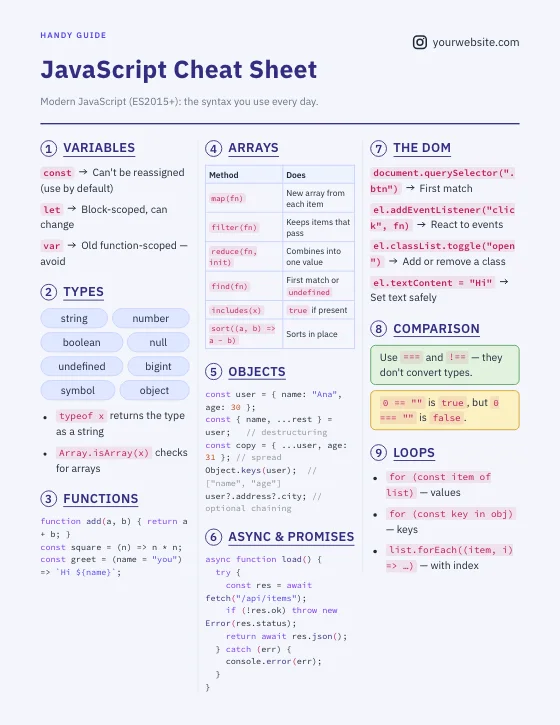
For layout tips, see how to make a cheat sheet.
Try the free Cheat Sheet MakerStart from a JavaScript template and edit it into your own reference, then download PDF or PNG.Try the free Code Screenshot GeneratorTurn a snippet into a clean image for slides, docs or social posts.Frequently asked questions
What is the difference between let, const and var?
const and let are block-scoped; const can't be reassigned, let can. var is function-scoped and hoisted, which causes subtle bugs, so modern code uses const by default and let when needed.
What is the difference between ?? and ||?
|| returns the right side for any falsy value, including 0 and an empty string. ?? only returns the right side when the left is null or undefined, so it keeps 0 and "".
Does map change the original array?
No. map, filter and slice return new arrays. sort, reverse and splice change the original; use toSorted and toReversed for non-mutating versions.
Why doesn't fetch throw an error on a 404?
fetch only rejects on network failures. For HTTP errors, check response.ok or response.status and throw your own error.